
Your old card expires. A replacement arrives. You update the services you use every day and leave an unwanted subscription alone. Surely its next payment will fail.
Then the charge appears.
Here is one possible explanation: the payment system supplied updated card details behind the scenes. You never typed the new details into that company’s website, but its billing information stayed current.
This is an illustrative scenario, not a report about a particular subscription. Services such as Visa Account Updater are designed to help payments survive expired or replaced cards. Their existence makes a new card an unreliable way to end a recurring charge.
The useful question is what you actually want to change: the card details, permission to take payments, or the subscription itself.
The update you never typed
When you save a card with a business, the payments industry calls that a credential-on-file arrangement. A subscription is one use; a shopping account that remembers your payment method is another.
Visa Account Updater lets participating card issuers, payment intermediaries and qualified merchants exchange changed account information. Updates can include a new card number or expiry date, alongside notices such as an account closure. Visa’s technical introduction describes the service.
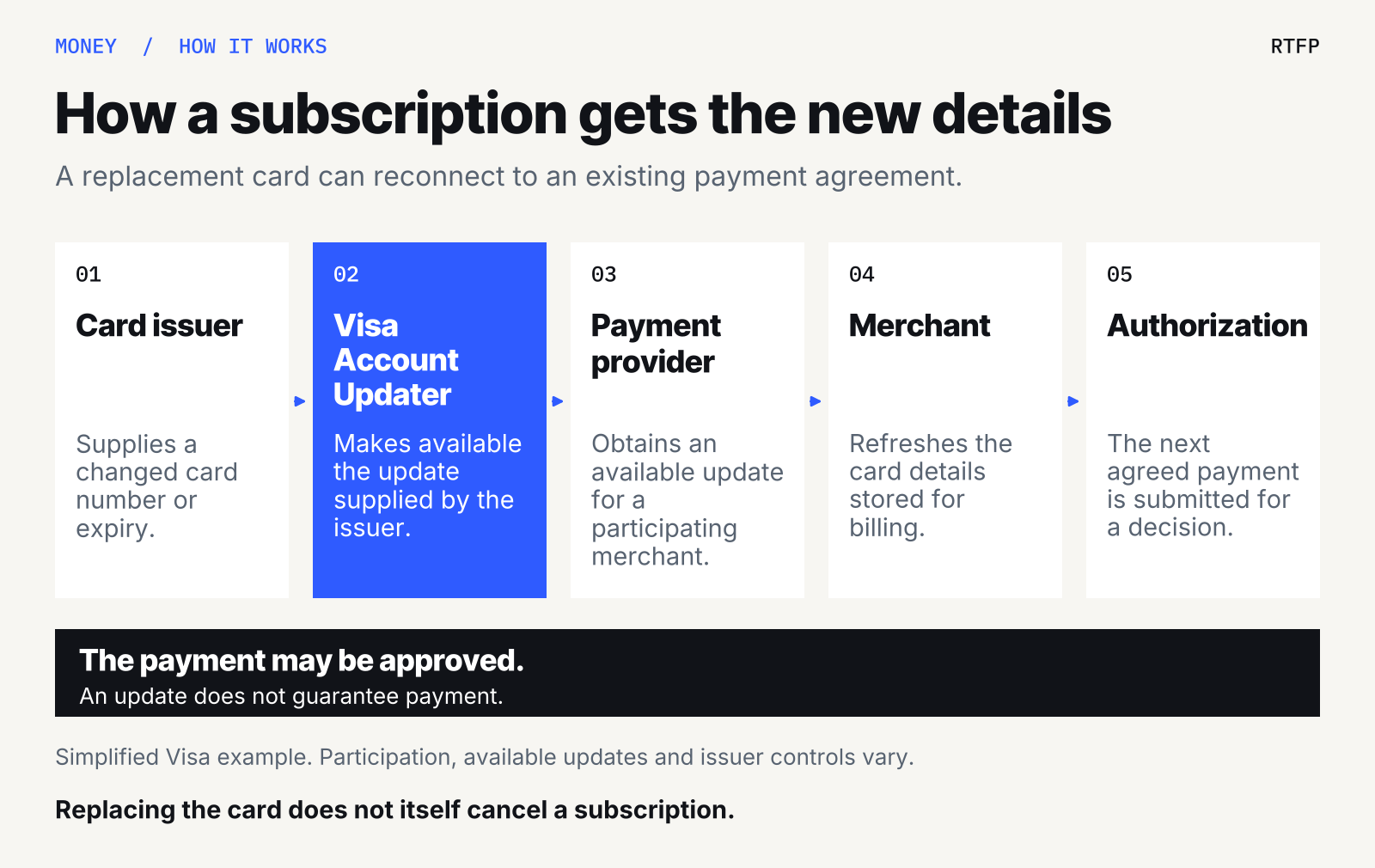
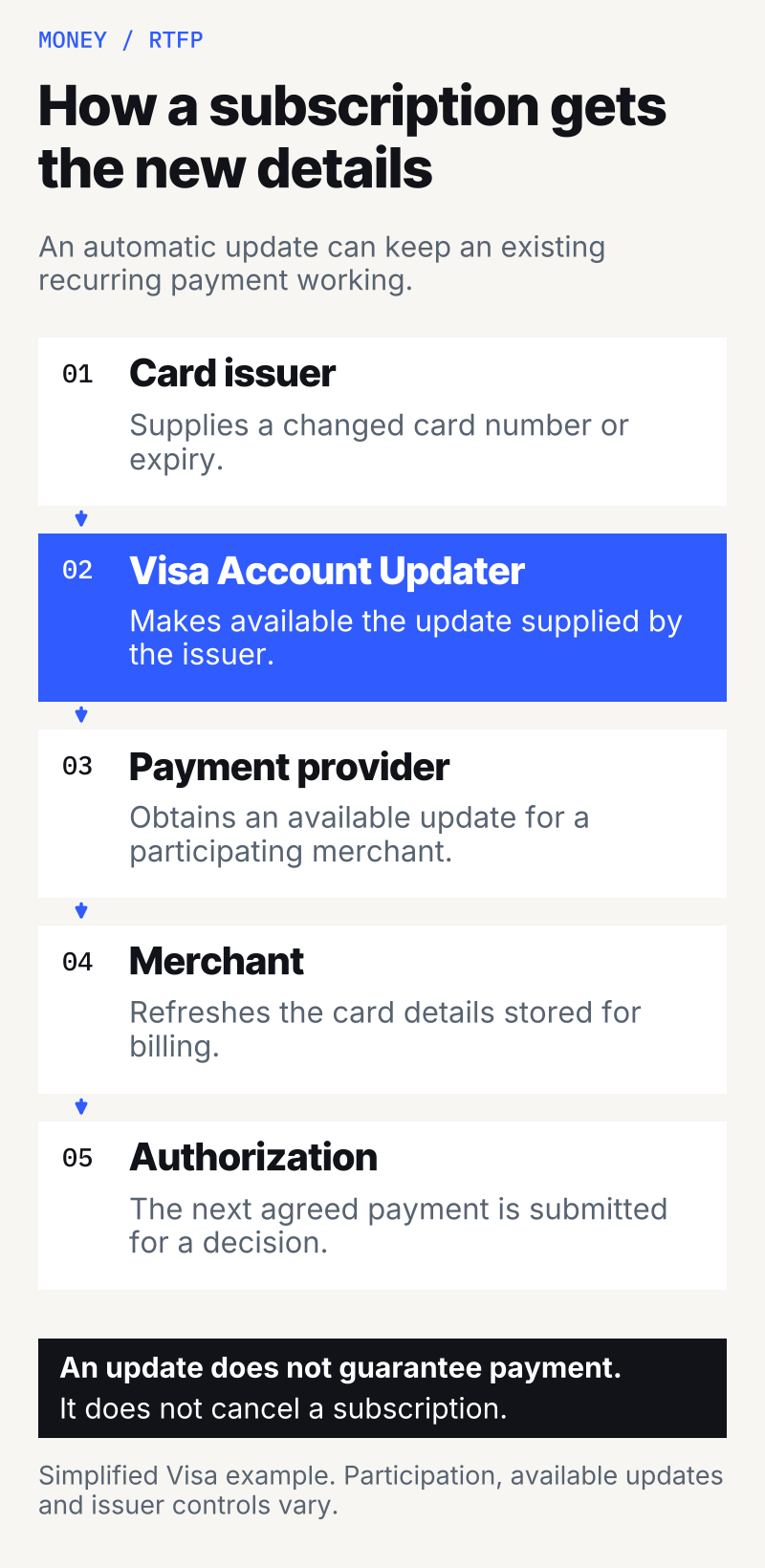
In a simplified version, the bank that issued your card sends an update to Visa. A participating merchant, through its payment provider, checks for changes. If an update is available, the merchant can refresh its billing records before submitting the next payment.
Visa also has a real-time version that can apply an available update during payment processing. The exact route varies. Its service overview describes the different arrangements.
Mastercard has a comparable program, Automatic Billing Updater. Its privacy notice gives the example of an expired card saved in a merchant’s app being updated without further action from the customer.
So a familiar subscription charging your replacement card does not, by itself, show that someone guessed the number or broke into your account. It also doesn’t establish that the charge was valid. That requires a separate look at what you agreed to.
The convenience is real
Imagine replacing a lost wallet’s contents. You still want your phone service and the cloud storage holding your files. Hunting down every billing page adds another chore, and an overlooked payment could interrupt something useful.
Automatic updating is intended to reduce that disruption. The merchant also benefits: fewer payments fail solely because stored details became outdated. Visa explicitly markets the service around preventing avoidable declines and preserving recurring revenue. That is the business case on its product page.
The awkward part appears when your intentions have changed. You remember the music subscription you love and forget the exercise app you stopped opening months ago. Keeping billing details current can help both continue.
That tension follows from the mechanism. A service that keeps payment information usable cannot make your decision about whether the subscription still earns its place in your budget. You have to communicate that decision through cancellation or the appropriate payment controls.
An update has limits
This is a participating system, rather than a promise that every replacement card will work everywhere. The issuer must provide relevant information, the payment route must support the service, and available controls can affect what is shared.
It also has conditions on who may ask. Visa’s acquirer documentation says inquiries are for accounts where the merchant has an ongoing customer relationship and the customer authorized payments using the stored credentials. An update supplies information; it does not create permission to charge someone who never agreed.
Nor does it guarantee transaction approval. Visa’s real-time flow still sends an authorization request to the issuer after applying an update.
Closing an account is another distinction. Visa can return a closed-account notice or an instruction to contact the cardholder. Its issuer documentation distinguishes those notices from replacement details. A system that communicates account closures should not be read as a mechanism that makes closed accounts perpetually chargeable.
For the same reason, don’t assume automatic updating has covered every bill you want to keep. Verify important payments after a replacement.
Ending the subscription and stopping the payment
Start with the subscription’s cancellation process. Check when cancellation takes effect and save the confirmation. A final bill may relate to a period or commitment that has already begun; ask the business what it covers if it is unclear.
There are two issues to resolve: whether the service agreement has ended and whether future recurring card payments are authorized. Blocking a payment does not necessarily settle a contractual amount you still owe.
For UK readers, the rules are specific. The Financial Conduct Authority says you can cancel a recurring card payment through the business or your card issuer. The issuer must stop it when asked and cannot require you to contact the business first. Make the request by the end of the business day before the next payment is due.
The FCA also says cancellation of the payment does not necessarily end the contract. Payments taken after the recurring payment is cancelled are unauthorized and must be refunded, with related charges. See its UK recurring-card-payment guidance.
Those are UK rights. Elsewhere, check local rules and your issuer’s dispute process. Card payments and withdrawals using bank-account details can have different procedures.
What to ask your card issuer
If a charge has followed a replacement card, ask a focused question: “Was this payment connected to an automatic account update, and how do I stop future payments to this merchant?”
Visa’s issuer FAQs describe opt-out mechanisms and merchant-specific instructions that can prevent a particular merchant from receiving updates for a card. Ask what your issuer supports, what it will actually block, and whether wanted payments could be affected.
Preventing the sharing of updated details is a different operation from cancelling a subscription or stopping a payment. Get the issuer to identify which action it has taken.
If you don’t recognize the merchant, or you replaced the card because of fraud, report the charge promptly through your issuer’s official app or published contact details. An explanation involving an updater is no reason to dismiss an unauthorized charge.
Finish with proof
You don’t need another replacement card as your first cancellation strategy. You need a clear record of what happened:
- Cancel the unwanted service and keep the effective date and confirmation.
- Tell the issuer about charges you did not authorize or charges continuing after cancellation. Ask about stopping future payments and disputing existing ones.
- Check subsequent statements, including around the next expected renewal.
The US Federal Trade Commission’s subscription guidance recommends preserving cancellation records, monitoring statements and disputing charges that continue. It also advises following up in writing to protect applicable dispute rights.
A replacement changes the payment details. Make sure the business and your issuer have also understood what you want to happen next.